
Staff — review + approve / reject regear requests
Members submit regears on #Request Regear; everything they submit lands here, on #Review Requests, for staff to triage. This page walks through the review queue end-to-end.
Permissions
You need the Approve Regear Requests permission (under the Regear section of Edit Role → Permissions) to see this channel and to act on requests. Most guilds grant this to the Regear Staff / Regear Manager / Manager role presets. See Permissions reference for the full table.
The review queue
Open #Review Requests from the sidebar's REGEAR TEAM section.
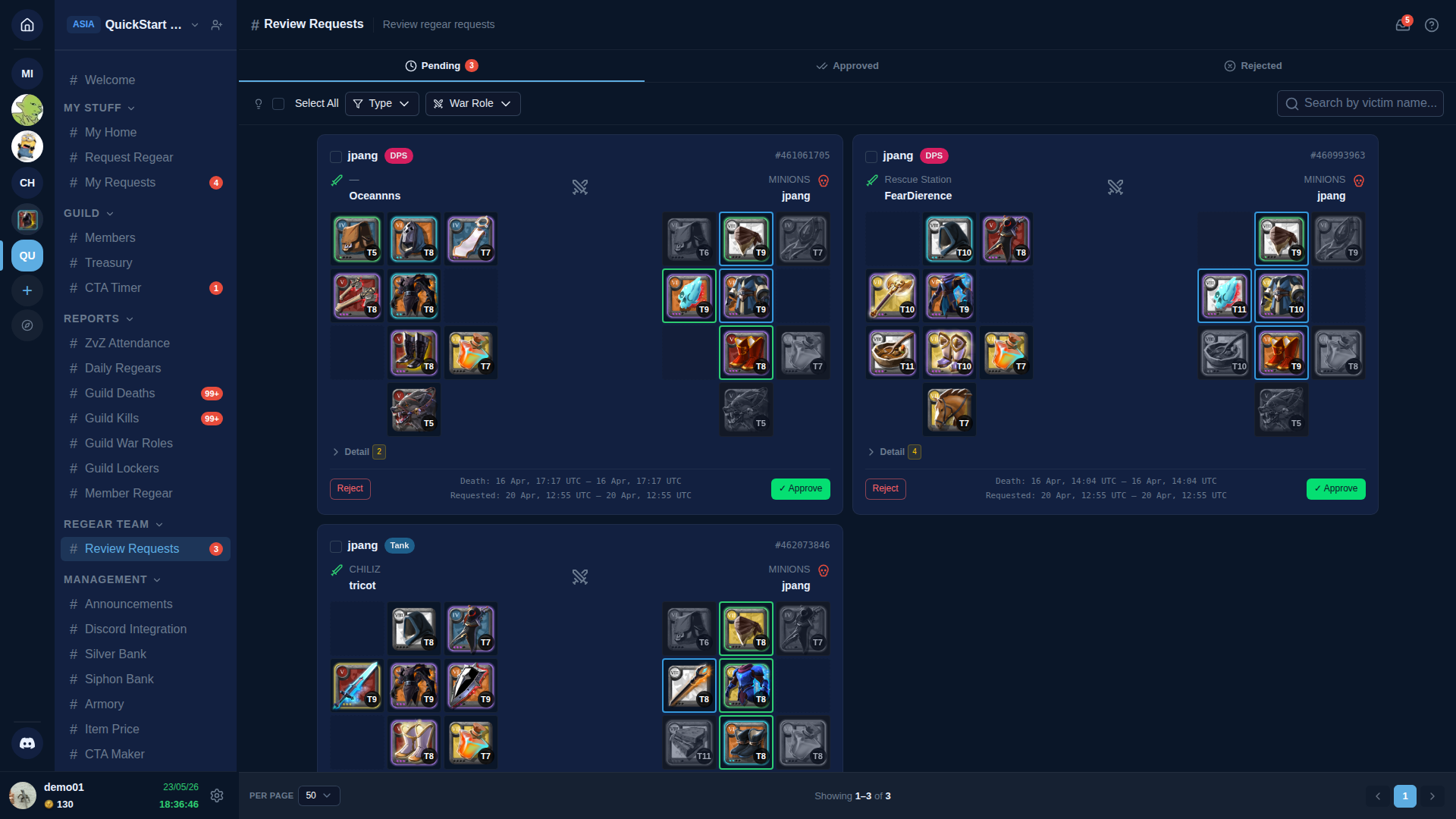
Top of the page:
- Tabs —
Pending/Approved/Rejected.Pendingis the work queue; the other two are audit views. - Toolbar (per Pending tab):
- Select all checkbox — for multi-select bulk actions.
- Type filter —
All/Deaths/Overcharge. - War Role filter — narrow to a specific war role's requests (useful when one role is dominant in a CTA).
- Search — accepts a victim name OR a
#event_id(the 9-digit Albion event ID prefixed with#, e.g.#475568182). The event ID is the same number Albion's death feed and event-link URLs use, so when a member messages you in Discord with a kill link asking "did this one go through?" — copy the trailing number, prefix#, paste, and the queue filters to just that row. The same#event_idsearch works on #Cut-off Tasks so you can trace one death from the review queue all the way to the packer side.
Each card on the queue is one request:
- Top row — member name + character + war role badge (
Outcomers/FreezDawnera/Riderrin the screenshot). - Middle — the death event link (eventID) + a 3×4 equipment grid showing the lost items with per-slot validation badges:
- 🟢 OK — slot matches the role's loadout at the expected tier.
- 🟡 Under-tier — item is a lower tier than the role calls for.
- 🔵 Over-tier — item is a higher tier.
- 🔴 Invalid — item isn't in the role's loadout at all.
- Bottom row — Action buttons + metadata (UTC death timestamp + fame).
The three actions per request
✅ Approve
Approves the request. What happens next depends on the guild's regear mode:
- Item mode — request moves to
approvedstate; the green button is labelled Create Cut-off Task (single + bulk). Click it to bundle the request into a packing task in#Cut-off Tasks. See Item mode — cut-off + locker. - Silver mode — request moves to
approvedstate; the green button is labelled Payout (single + bulk). Click to credit silver to the member's Silver Bank wallet. See Silver mode — payout from Silver Bank.
Same Approve action, different second-step button based on guild config. There's deliberately a gap between approve and the actual money/items moving — see Two-step lifecycle below.
❌ Reject
Rejects the request outright. A reason prompt opens — type the reason (e.g. "Wrong war role — not assigned for this CTA"), confirm. Member sees the rejection + reason on #My Requests.
Once rejected, the request is terminal — it doesn't come back to the queue. If the member objects, they can submit a new request with corrected info.
📁 Archive
Removes the request from the Pending queue without approving or rejecting — moves it to the Archived view. Use when a member submits a duplicate, an old request that's no longer actionable, or anything you want to hide without committing to a decision.
Validation policy gating
What the validator does with under-tier / over-tier / invalid issues is decided by the guild's Regear Policy (Settings → Regear Policy). Three policy slots, each independently set to one of:
- Auto-reject — request is rejected on submit; never reaches this queue.
- Allow — request flows through to staff with the issue noted but the Submit button never blocks the member.
- Staff decision (default) — request reaches the queue; staff sees the issue + decides per-request.
If your guild uses "Staff decision" for invalid slots, expect to see requests with 🔴 badges that are still your call. The per-slot info helps you decide between Approve (forgive), Reject (refuse), or Approve-with-override (e.g. picking a different war role at approval that does match the gear).
War role override at approval
Click on the war role badge at the top of a request card to change the war role for this specific request. This re-runs validation against the new role's loadout — useful when:
- The member misclicked the war role at submit time.
- The lost gear actually maps to a different role's loadout (e.g. a Holy Healer ran Lifecurse).
- You want to apply a different silver cap (in War Role — Capped by actual mode, the cap from the chosen role is what applies at Payout).
The override is recorded in the audit log for transparency.
Multi-select bulk actions
Tick the Select all checkbox (or per-card checkboxes) → the toolbar reveals bulk Approve / Reject / Archive buttons.
- Bulk Approve — approves N requests in one call. Each request still goes through per-mode logic — item mode creates one cut-off task per request (no bundling); silver mode credits N payouts one-after-another but as a single batch action.
- Bulk Reject — opens a reason prompt; same reason applied to all selected. Use for clear-cut violations ("All these failed the war role check").
- Bulk Archive — moves all selected out of pending. No prompt.
Two-step lifecycle
Why approve and deliver are separate clicks:
- Silver is real currency. Approve = "yes, this is a valid claim." Payout = "yes, move the silver." Stripe / payroll / PayPal all separate these.
- Reversal window. If you spot an error between approve and pay, reject the row before money moves. No compensating ledger entries needed.
- Batching for payday. Staff can rack up a week of approveds and pay them all on a single Payday — single Audit log entry, one Discord notification.
- Mode-agnostic pending. Pending requests don't care which mode the guild is in. If your guild switches modes (item → silver), pending requests don't need migration — they commit to the new mode when approved.
For item mode the bundling step is even more visible: approve → request waits → bundle into a cut-off task → packer does the work. The cut-off task is the actual handover — approval is just the green light.
What members see
Once you act on a request, the member sees it update on #My Requests (their personal tracker):
- Approved → progress strip advances to step 2 of 5.
- Rejected → row goes red with your reason.
- Archived → row disappears from their Pending view.
The progress strip then continues as the cut-off task / Payout flow advances. Full member-side detail in Members — submit a regear.
Related pages
- Regear pipeline overview — modes + bifurcation explained
- Members — submit a regear — the upstream submit flow
- Item mode — cut-off + locker — what happens after Approve in item mode
- Silver mode — payout from Silver Bank — what happens after Approve in silver mode
- Settings — Regear Policy — validation policy + mode selection
- Member Regear Report — the per-member audit view