
Armory + Low Stock
The Armory is your guild's inventory tracker — for each base item, how many you have on hand at each tier × enchant × quality combination. Open it from the sidebar under MANAGEMENT → Armory.
Where the data comes from: paste your guild chest's in-game log, manually add / remove, or let the Cut-off Task workflow auto-deduct as packers fulfil regears. The Armory is the source for the [📦 x{n}] stock badge that appears on Cut-off Task pick lists (when the Show stock in pick list sub-toggle is on — Settings → Guild Systems).
Permissions
- View Banks, Armory & Item Price — see the inventory grid + log.
- Manage Banks, Armory & Item Price — paste logs, manually adjust, set low-stock alerts.
What's on the tab
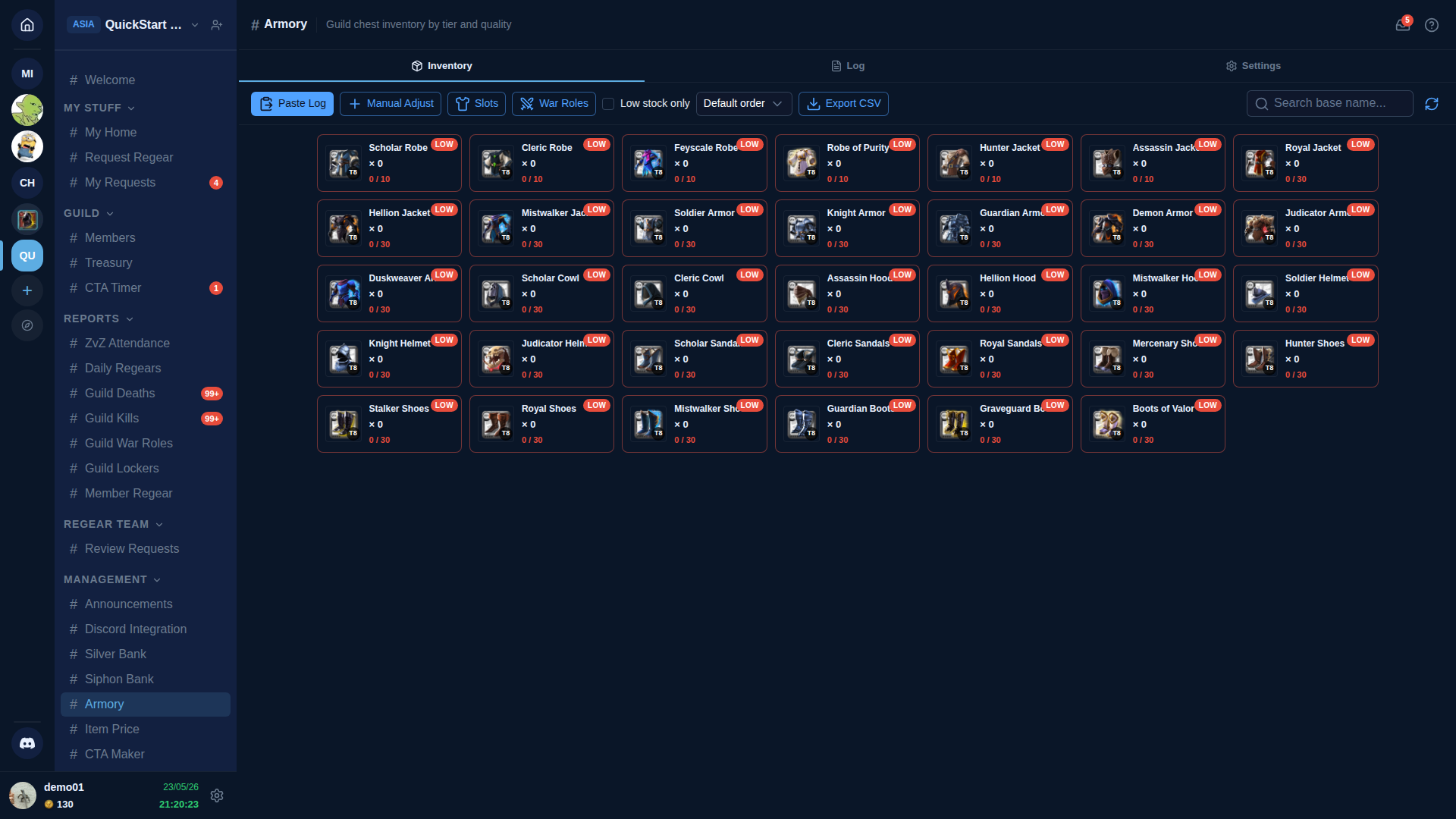
Three tabs: Inventory (default), Log, Settings.
Inventory tab
The card grid is the main workspace. Each card shows:
- Item image + name (e.g. "Scholar Robe").
- Tier badge (e.g. T8) — the tier-enchant combination shown.
- Count — current quantity.
The toolbar offers:
- Paste Log — open the chest-log paste modal (same workflow as Silver Bank / Siphon Bank).
- Add / Remove — manual single-item adjustment with reason.
- Low stock only checkbox — filter to items below their configured low-stock threshold.
- Export CSV — download the current grid as a spreadsheet.
- Search — by item name.
Click a card for the per-item detail drawer: tier × enchant × quality breakdown, last-touched timestamp, recent log lines touching this base item.
Low Stock alerts
In Settings, set a low-stock threshold per item (or per category). When stock dips below the threshold, the item card shows a red exclamation badge + the channel sidebar gains a "🛑 N items low" indicator.
Combined with the Show stock in pick list sub-toggle, packers also see live stock counts next to each item on Cut-off Task pick lists — they can spot mid-pack "we're out of T8 Knight Armor" before they walk to the chest.
Log tab
Standard chest-paste workflow — paste, Apply or Disable per line, applied rows commit to the inventory.
Settings tab
- Low-stock thresholds — per item or per category.
- Auto-deduct on regear delivery — when on, completing a cut-off task automatically debits the items from the Armory. Default on.
- Visible categories — filter to show only weapons / armor / consumables / etc.
Cross-links
- Item mode — cut-off + locker — consumer of the stock badge.
- Item Price — pairs with Armory for total-value views.
- Settings → Guild Systems — toggle Armory + the Show stock in pick list sub-toggle.
- #Armory channel reference.