
Settings → Guild Systems
The Guild Systems tab is the one canonical place to turn each AO Master subsystem on or off for your guild. Open it from the Settings modal under POLICIES → Guild Systems.
This page is the operator's reference. For what each system does, see the deep-dive pages linked from each section.
Permissions
The Guild Systems tab requires Manage Guild. Toggling any system writes to the audit log so the rest of staff can see who flipped what.
Why this is the only place to flip these toggles
Each system here powers multiple downstream features. Silver Bank, for example, isn't just used by #Silver Bank — it's the wallet for Silver Regear payouts (see Silver mode — payout), it's where Member Regear Report's silver totals come from, and so on. Flipping a system off from inside one of its child surfaces would silently break the others.
That's why every other Settings tab (Regear Policy, War Roles, Armory, …) shows these as status-only with a Manage in Guild Systems deep-link back here, instead of giving you an inline toggle. The Guild Systems tab is the canonical home — there's no other place to actually turn these on or off.
The five systems
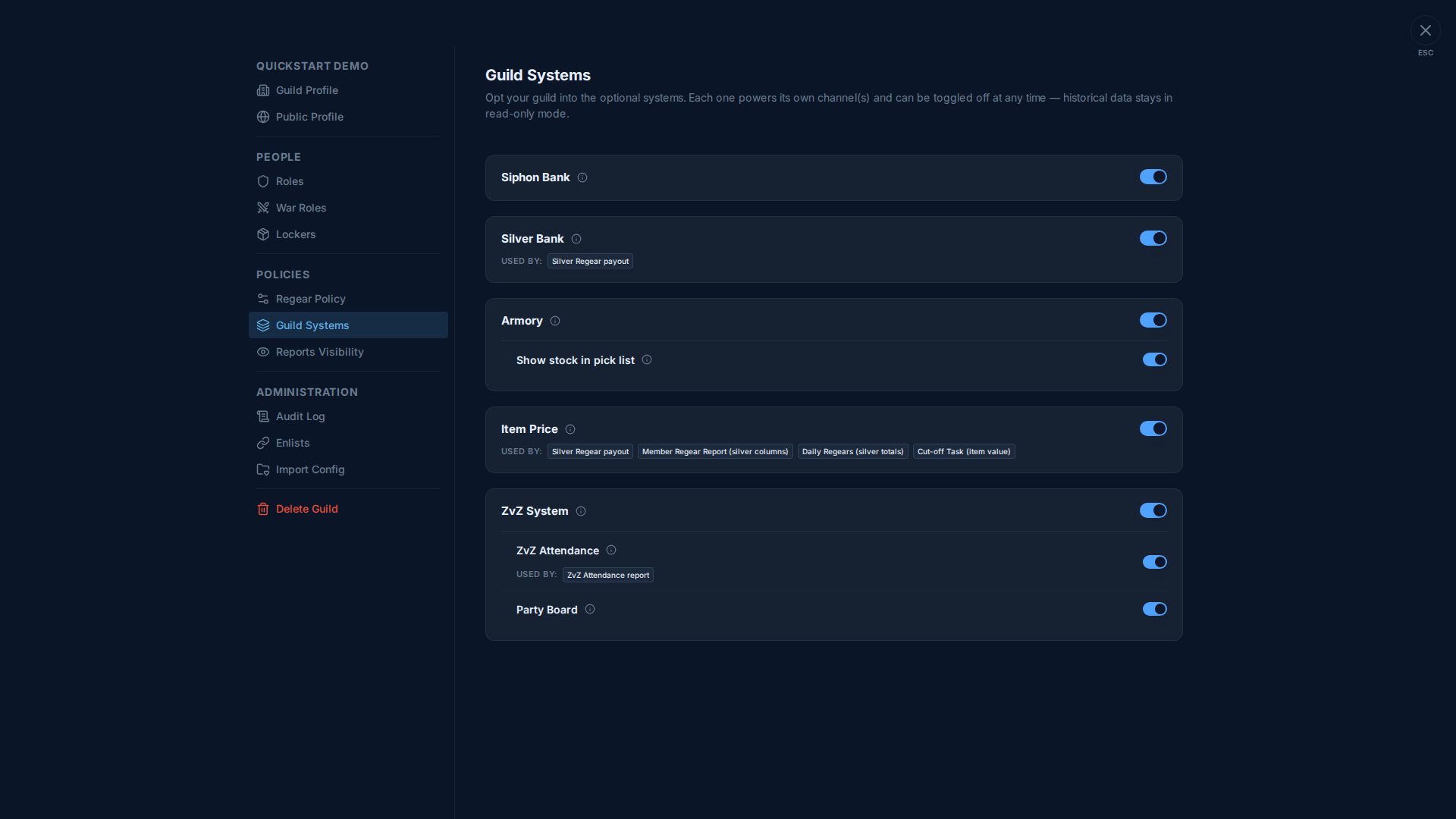
Each card is one toggle. Each card may also show:
- A small (i) tooltip beside the title with a one-line description.
- A USED BY: row of chips listing other features that depend on this system being on. Flipping the system off breaks those features — the chips are your warning of who else is affected.
- A tier-gate hint if your subscription tier doesn't include the system yet, with an Upgrade link.
- One or more sub-rows for sub-systems that only make sense when the parent is on (Armory has one, ZvZ System has two).
Siphon Bank
| Field | Detail |
|---|---|
| What it does | Tracks each member's siphon deposits + withdrawals from the in-game chest log. Surfaces a net-per-member view and a debtor view. |
| Channel(s) it enables | #Siphon Bank |
| Tier-gated | Yes — your guild's current tier is shown on #Treasury |
| Deep-dive | Siphon Bank |
Silver Bank
| Field | Detail |
|---|---|
| What it does | Full silver ledger: member balances, staff add/remove, withdrawal queue, instant member-to-member transfers. |
| Channel(s) it enables | #Silver Bank |
| Used by (other features) | Silver Regear payout — the silver from approved silver-mode regears lands in member wallets here. See Silver mode — payout. |
| Tier-gated | Yes |
| Deep-dive | Silver Bank |
Armory
| Field | Detail |
|---|---|
| What it does | Inventory tracker — aggregate item counts per tier / enchant / quality from the in-game chest log. Staff-only view with manual adjustment support. |
| Channel(s) it enables | #Armory |
| Sub-toggle | Show stock in pick list — adds a [📦 x{n}] badge per item card on Cut-off Task pick lists, so packers can spot low-stock items at a glance. |
| Tier-gated | Yes |
| Deep-dive | Armory + Low Stock |
Item Price
| Field | Detail |
|---|---|
| What it does | Silver-cost tracker fed from the Albion Online Data Project market feed. Powers the regear cost calculator, Armory value snapshots, and Cut-off Task value snapshots. Staff can override per-item prices when the guild has a crafter deal cheaper than the market. |
| Channel(s) it enables | #Item Price |
| Used by (other features) | Silver Regear payout (Sum-by-Item-Price + Capped sub-modes). Member Regear Report silver columns. Daily Regears silver totals. Cut-off Task value snapshots. See USED BY: chips on the card. |
| Tier-gated | Yes |
| Deep-dive | Item Price + market data |
ZvZ System
| Field | Detail |
|---|---|
| What it does | Schedule CTA events; let shot-callers run timers + party boards during the event. |
| Channel(s) it enables | #CTA Maker, #CTA Timer, #Guild War Roles, #ZvZ Attendance (only when ZvZ Attendance sub-toggle is on) |
| Sub-toggle: ZvZ Attendance | Optical-character-recognition on uploaded party-roster screenshots — matches names against your roster to record attendance. Powers the ZvZ Attendance report (#ZvZ Attendance). |
| Sub-toggle: Party Board | Shot-callers build preset party comps; events can pick multiple parties; members sign up for open slots from #CTA Timer. |
| Tier-gated | Yes |
| Deep-dive | CTA / ZvZ event workflow |
Turning a system off
Flipping a system off is non-destructive — the underlying data stays in the database and the channels go into read-only mode. Re-enabling later brings everything back as you left it.
That said, switching off a system that's in USED BY: another feature has knock-on effects:
- Silver Bank off + guild on a silver-payout mode → no new payouts can be paid (the silver lands nowhere). The Regear Policy Setup Checklist surfaces a ⚠ on the row. Members can still see existing balances; staff can't add new credits.
- Item Price off + guild on a silver-payout mode → no new approvals can capture cost snapshots, so future payouts fail with "missing prices" errors. The Member Regear Report silver columns disappear too.
- ZvZ Attendance off → no new screenshot uploads accepted; existing data stays viewable.
The Regear Policy Setup Checklist (Settings → Regear Policy) re-evaluates these dependencies live, so flip them on/off there to immediately see what gets unblocked or broken.
Tier gating
Each system displays a small badge if your guild's subscription tier doesn't include it (e.g. "Requires Pro tier or higher"). To upgrade, open the guild's #Treasury channel — it shows the current tier, the cost in Gold to upgrade, and the per-tier feature matrix. If your guild's Treasury doesn't have enough Gold yet, members can deposit Gold there from their personal balance on #My Gold (under /channels/@me). See Subscription tier + billing for the full personal Gold → Treasury → upgrade flow.
A guild that downgrades from a paid tier to free keeps any systems that were on (read-only) but can't turn them on again until the tier is upgraded back.
Other tier-gated features (not on this tab)
A couple of optional systems are configured outside this tab but follow the same tier-gating rules:
- Crafting Material Planner (Basic tier) — its own page under GUILD ECONOMY → Crafting. Region return-rate config + per-guild crafting plans live there. See Crafting Material Planner.
- Alliance (Pro tier) — configured under Settings → Discord Integration → Ally. Hosts an Apply-as-Ally pipeline so partner-guild members can sign up for your CTAs. See Settings → Discord Integration and the #Allies channel.
Both features show the same "Requires X tier" hint + Upgrade link on their own surfaces when the tier doesn't qualify.
Save flow
The tab has a sticky "Careful — you have unsaved changes!" bar at the bottom when any toggle differs from the saved state. Click Save to commit; Reset rolls back to the saved state.
The save is all-or-nothing across the whole tab — if one toggle fails (e.g. tier-gate violation slipping through stale UI), nothing changes.
Cross-links
- Settings → Regear Policy — consumer of Silver Bank + Item Price toggles. Pairs naturally with this tab.
- Silver Bank · Siphon Bank · Armory + Low Stock · Item Price — the four bank-related deep-dives.
- CTA / ZvZ event workflow — what the ZvZ System enables.
- Crafting Material Planner — tier-gated, configured outside this tab.
- Settings → Discord Integration — where Alliance is configured (also tier-gated).
- Subscription tier + billing — for the tier-gate side.