
Settings → War Roles
A war role is a name + colour + loadout (which items + tiers each slot should have) + a list of assigned members + an optional Silver Cap. Open the tab from the Settings modal under PEOPLE → War Roles.
War roles are the spine of three subsystems: regear validation (your loadout must match the role you picked at submit time), CTA party composition (each event slot has a war role), and silver-mode regear payout (the role's Silver Cap drives War Role — Fixed cap / Capped by actual modes).
Permissions
The tab requires Manage War Roles to open. The same permission gates editing loadouts, assigning members, and saving the Silver Cap.
The list view
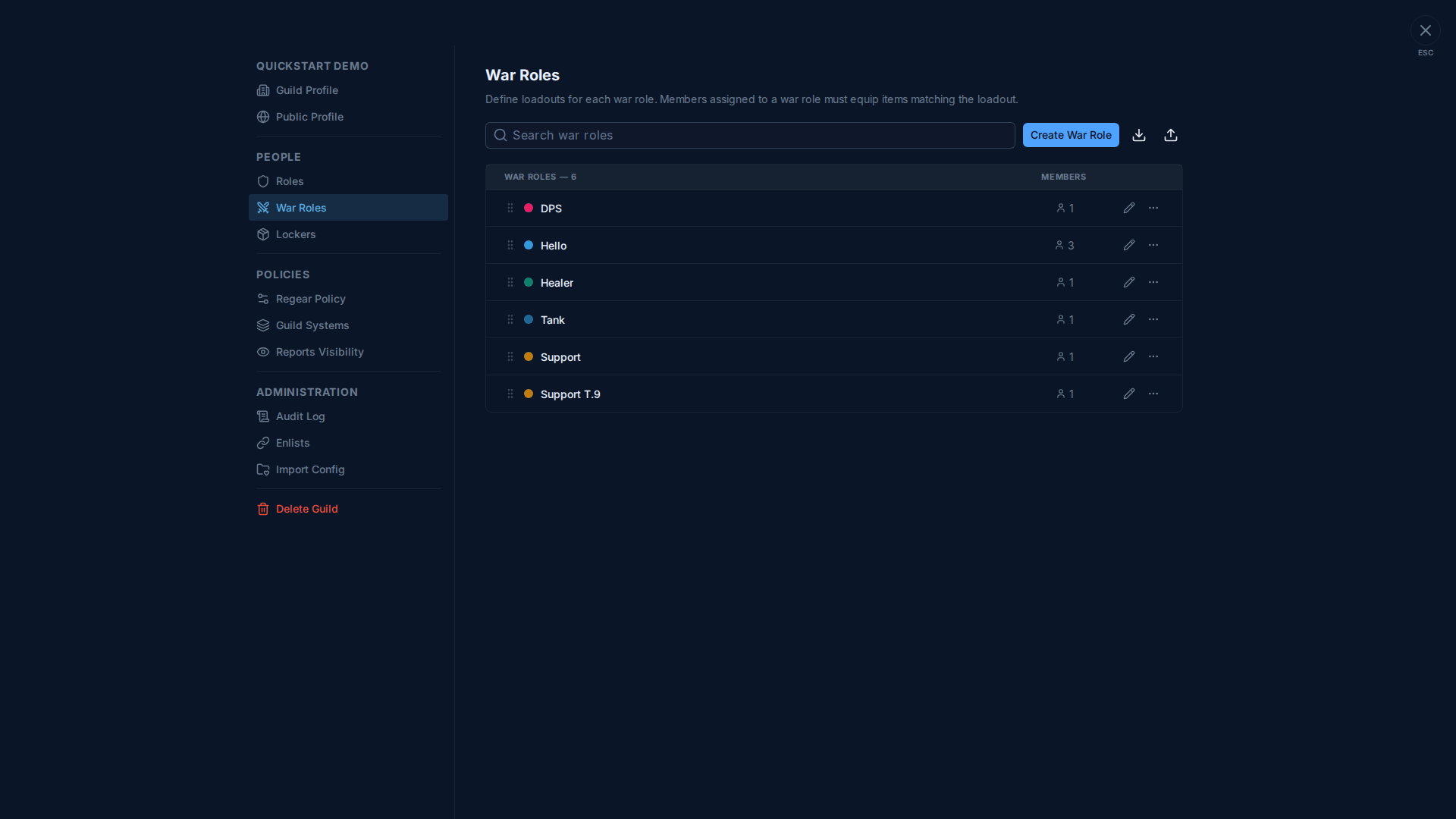
Each row shows:
- Drag handle — reorder. The order is what shows up on CTA Maker / Party Board pickers + the public Welcome page widget.
- Colour dot + name — used in regear-submit dropdowns, on
#Review Requestsrequest cards, on attendance reports, etc. - Member count — how many members hold this role.
- Pencil icon — open the editor.
- 3-dot menu — duplicate, rename, delete.
The two icons in the top-right of the toolbar are Export (download the current war roles as a config blob) and Import (paste a blob back, e.g. from a sibling guild's setup).
The editor
Clicking a row opens a 3-tab editor:
| Tab | What's there |
|---|---|
| Display | Name + colour swatch picker. |
| Loadout | The 10-slot equipment grid. Per slot you pick: required item family, minimum tier, optional alternate items, and the No Regear flag (mark this slot as not eligible for regear — e.g. consumables you don't compensate). |
| Members | Add / remove members from this role. A member can hold multiple war roles; at regear-submit time they pick which one they were running for that death. |
Below those tabs, when the guild is on a silver payout mode (Settings → Regear Policy), a Silver Cap input also appears — this is the per-role cap that drives War Role — Fixed cap / Capped by actual sub-modes. Leave it blank to clear the cap; payouts on requests using this role will then fail with "War role has no silver cap configured" until you set one.
The Silver Cap field is also editable in bulk from Settings → Regear Policy → Set War Role Caps — same field, two editors.
Loadout slot rules
Each of the 10 equipment slots (Main Hand · Off Hand · Head · Armor · Shoes · Cape · Bag · Mount · Potion · Food) has:
- Required item — the canonical item family the slot expects (e.g. "Cleric Robe").
- Minimum tier — the lowest tier the system accepts as a match. Coupled with the guild's Under-Tier Policy (Settings → Regear Policy) to decide what happens when a member submits something below this.
- Alternates — optional list of substitutes that also count as valid (e.g. a tank can run Knight Helmet OR Hellion Hood).
- No Regear — when on, the slot is ignored by regear (members can equip whatever there) and excluded from cut-off pick lists.
- Hide in validator (only with No Regear on) — also hide the slot entirely from the submission validator's grid so members don't see a "missing" warning.
The validator computes per-slot status (OK / under-tier / over-tier / invalid) at submit time and the guild's Regear Policy decides what happens with each non-OK case.
Cross-links
- Settings → Regear Policy — the Set War Role Caps shortcut + the gear-validation policies that consume war role loadouts.
- Silver mode — payout — what Silver Cap actually does at payout time.
- Members — submit a regear — where members pick a war role at submit time.
- CTA / ZvZ event workflow — where war roles get used in party comps.