
Silver mode — payout from Silver Bank
In silver mode, AO Master pays approved regears as silver into each member's Silver Bank wallet — no items, no lockers, no cut-off tasks. Staff selects approved rows on #Review Requests, clicks Payout, and the silver lands immediately. This page covers the three silver sub-modes, the staff Payout action, the ledger trail, and what the member sees.
For the alternative delivery (pack items into lockers), see Item mode — cut-off + locker. For the upstream approval step, see Staff — review + approve. For the side-by-side comparison of both modes, see Regear pipeline overview.
Permissions + dependencies
The Payout action lives on the same surface as approval and uses the same permission — "Approve Regear Requests". There's no separate "Payout" permission. The reason: in silver mode, the approve + payout decisions are typically one-after-the-other, often by the same staff member.
What silver mode does need is the Setup Checklist — three things must be true before Payout works at all:
| Requirement | Where to flip |
|---|---|
| Silver Bank enabled | Settings → Guild Systems |
| Item Price enabled | Settings → Guild Systems |
| Regear Mode set to one of the silver values | Settings → Regear Policy → Silver Regear |
If any are off, the Setup Checklist on Settings → Regear Policy will surface what's missing — see Settings → Regear Policy for the full hub. The server re-checks every requirement on each Payout click, so a stale browser tab can't sneak past a Setup Checklist that's not satisfied.
The three silver sub-modes
Regear Mode is one dropdown on Settings → Regear Policy. Pick Silver payout as the top-level mode, then a Silver Mode dropdown appears with three sub-options:
| Silver Mode | What gets paid | Best for |
|---|---|---|
| Sum by Item Price | The sum of every lost slot's silver price (snapshotted at approve time from the Item Price channel). | Guilds that want regear value to track real market prices. |
| War Role — Fixed cap | A flat amount equal to the War Role's Silver Cap — ignores actual loss. | Guilds with simple per-role budgets ("everyone in DPS role gets 1M silver, win or lose"). |
| War Role — Capped by actual | The smaller of (sum of item-price snapshots) or (the role's Silver Cap) — pays actual but never overshoots. | Guilds that want a safety net against expensive surprises. |
The cap for War-role modes is set per war role on the Set War Role Caps sub-modal (Settings → Regear Policy → Setup Checklist → Set War Role Caps), or on the role's own row at Settings → War Roles → Edit → Silver Cap field. Roles without a cap configured will block payout with a "War role has no silver cap configured" error until the cap is filled in.
Switching modes is gated
Switching Regear Mode on a live guild is blocked when:
- Any cut-off task still has unresolved packing (leaving item mode) → finish or undo all active tasks first.
- Any approved silver request hasn't been paid yet (leaving silver mode) → pay out or reject every approved row first.
Picking a new value in the Mode dropdown triggers a check before the change is saved; if anything blocks it, you'll see an error toast with a deep-link to the affected list. Pending requests are mode-agnostic — they're not blocked by mode switches and just use the new mode when they get approved.
Silver Bank balances are never cleared by a mode switch. The bank is a persistent system; member balances roll over and remain withdrawable even when the guild moves back to item mode.
From Approved → Payout
The flow starts identically to item mode: staff reviews on #Review Requests → Pending tab → clicks Approve → the request lands in the Approved tab. From there, the bulk action button swaps based on the guild's Regear Mode:
| Guild's Regear Mode | Approved-tab bulk button |
|---|---|
| Item return | Create Cut-off Task (see item mode) |
| Any silver_* | Payout |
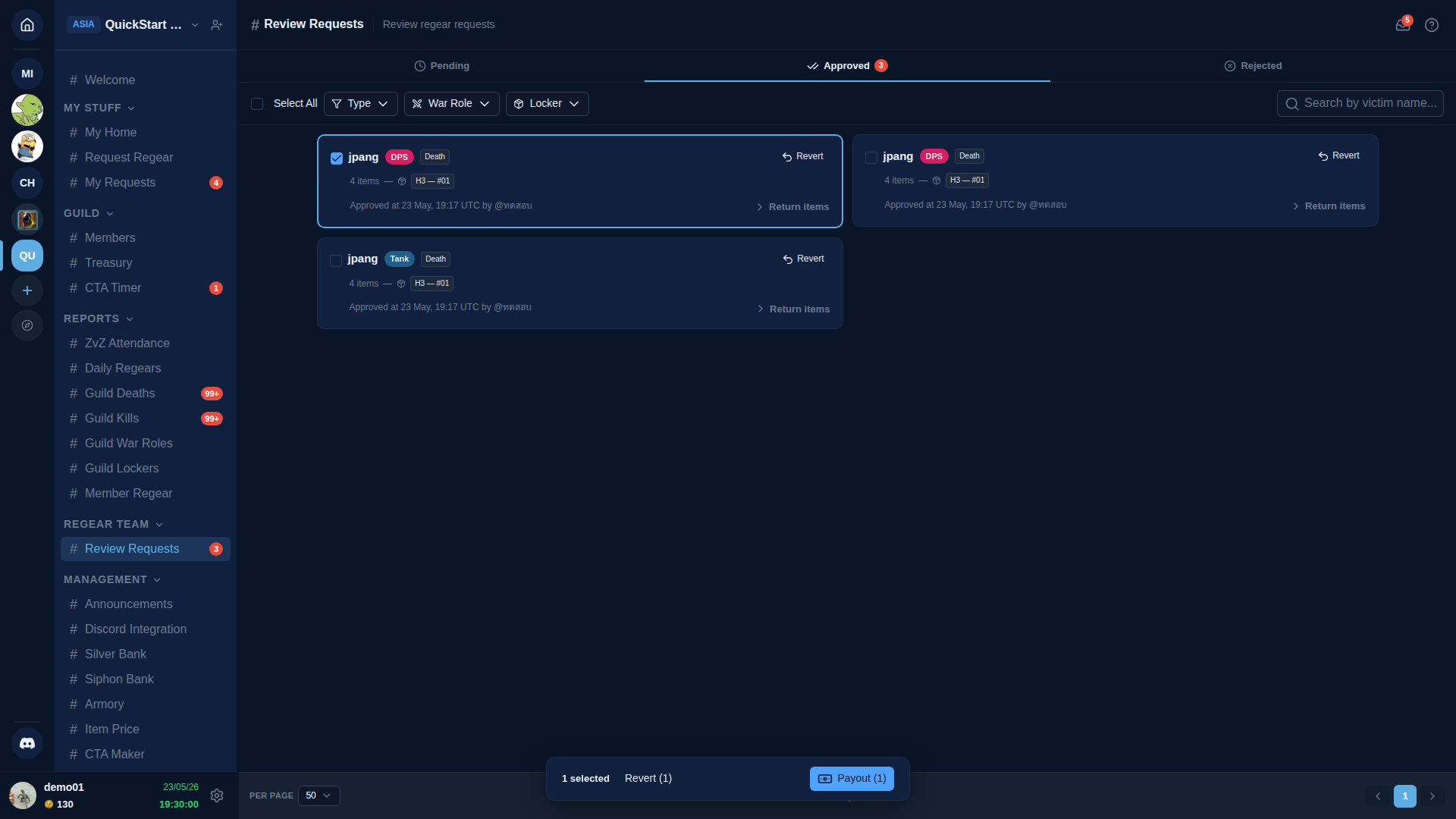
To pay:
- Open
#Review Requests→ Approved tab. - Tick the rows you want to pay. The bulk bar appears at the bottom with Revert and Payout action buttons.
- Click Payout. Each selected row is paid independently — partial success is OK, so some rows can succeed while others fail with a clear reason.
Each row's per-staff toast tells you what happened — "Paid out 3 request(s) — silver credited" on full success, "Payout failed — 2 request(s) blocked" with reasons when something went wrong.
What can block a single row
Each row in the bulk has its own validation. Common per-row failure messages and how to fix them:
| Failure message says… | What happened | Fix |
|---|---|---|
| Request status is "approved" — only approved requests can be paid | Row is no longer in Approved state (someone already paid or reverted it between the time you ticked it and clicked Payout) | Refresh + re-select. |
| Member has no linked Albion character | The requesting member has no character linked | Member must link their Albion character via #Members → 🔗 Link. Silver lands on a character name, not a user account. |
| War role has no silver cap configured | War-role mode + the chosen role has no Silver Cap set | Set the cap on Settings → Regear Policy → Set War Role Caps (or Settings → War Roles → Edit). |
| One or more items have no price snapshot from approval time | Sum-by-Item-Price (or Capped) mode + items had no Item Price data when the request was approved | Populate Item Price for those base items + re-approve (snapshot is captured at approve, not at payout). |
| Computed credit is zero — nothing to pay out | All items priced but the sum is 0 | Same fix as the missing-prices case — check the Item Price channel for those base items. |
The good news: failed rows stay in Approved so you can retry them after the fix. Already-paid rows in the same bulk aren't undone.
Where the silver lands — Silver Bank History
Each successful payout writes one Silver Bank ledger entry — an Add row tagged with a "Regear payout" note — crediting the member's character balance. It shows up on #Silver Bank → History:
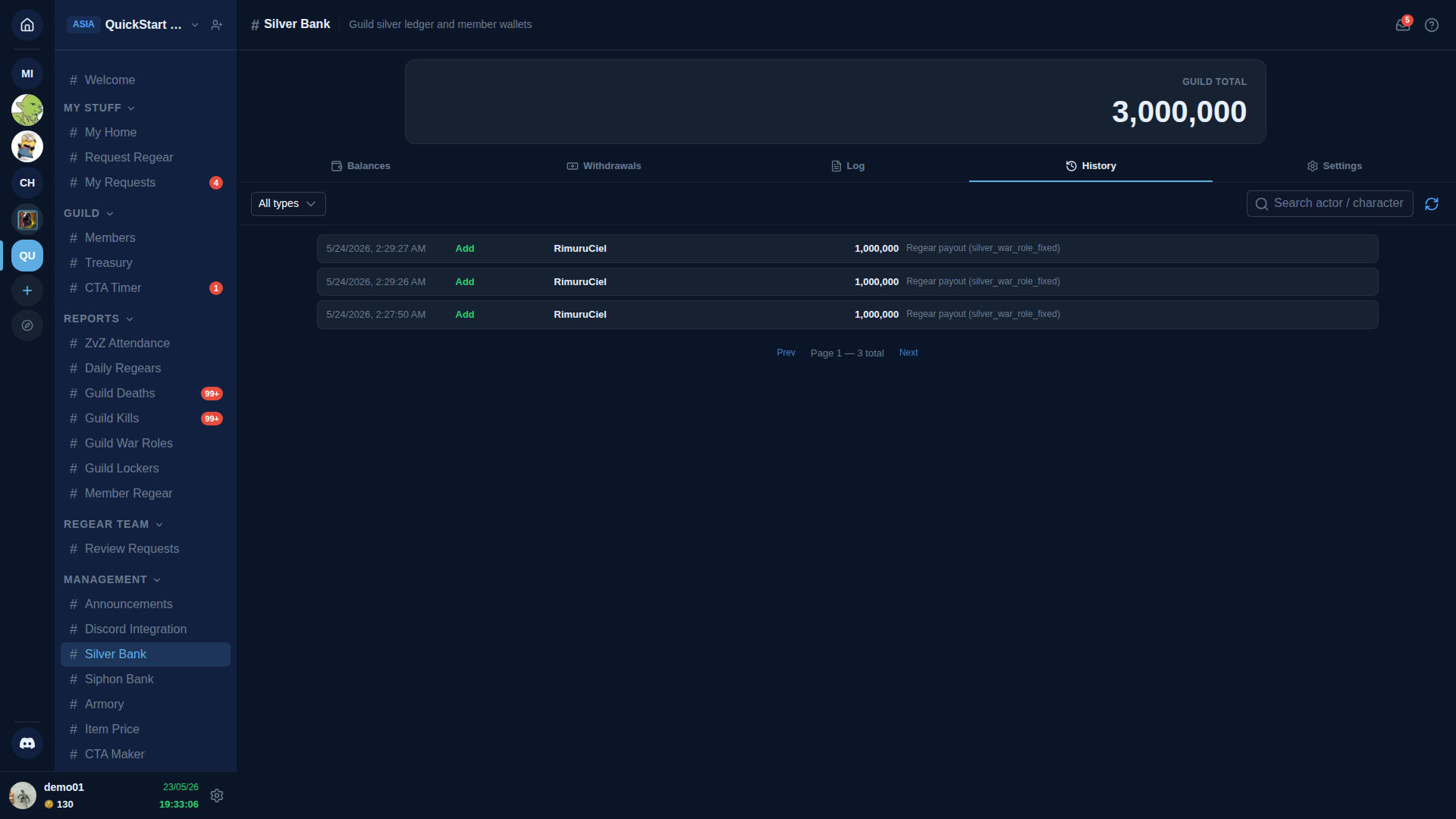
Each row shows:
- Timestamp of the payout.
- Type badge —
Addfor credits, with the colour matching the bank's add-flow theme. - Character — the member's Albion character name (silver lands per character, not per user).
- Amount in silver.
- Note — "Regear payout" plus the sub-mode name so audit later knows which math produced the credit.
The #Silver Bank page has four tabs total — Balances (per-character totals), Withdrawals (the member-initiated withdrawal queue), Log (raw chest-paste parse buffer — different concept), and History (the accounting ledger you see above). Full reference: Silver Bank.
Log vs History — common confusion
Log is for the chest-paste workflow (paste raw silver in/out lines from a deposit chest, mark each "Apply" or "Disable", then commit). History is the finished ledger of every credit/debit that landed in a member's wallet. Regear payouts skip Log entirely — they land in History directly, same as the manual Add button.
What the member sees
Once payout is complete, the request flips to Paid and the member's #My Requests row updates in real time — no refresh needed:
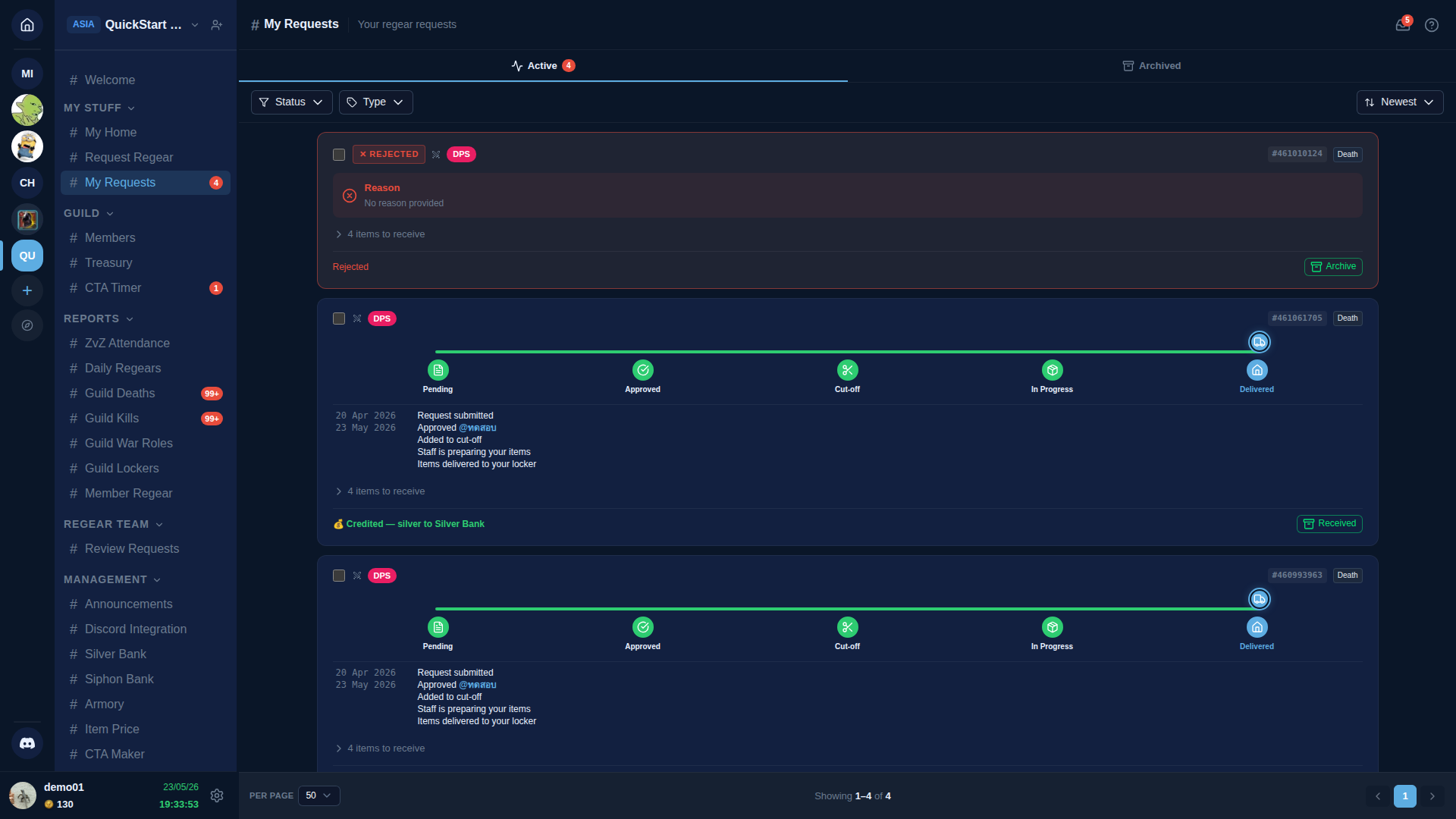
The paid card shows:
- All 5 progress steps green (Pending → Approved → Cut-off → In Progress → Delivered). In silver mode the cutoff / in-progress steps are conceptually skipped, but the strip animates straight to Delivered so the visual is consistent across modes.
- A 💰 Credited X silver to Silver Bank footer line. (The amount field shows an em-dash for the two War Role sub-modes — the per-item silver isn't recorded for those, so the page can't render the breakdown; the exact amount is on the Silver Bank ledger entry above. Sum-by-Item-Price mode does show the actual silver amount per request.)
- A Received action button — the member can mark the request as acknowledged.
The actual silver lives in the member's Silver Bank wallet, visible to them on #My Home → Silver Bank or directly under #Silver Bank → Balances. From there they can request a withdrawal via the standard Silver Bank withdrawal flow (see Silver Bank).
Why "Delivered" for silver?
The progress strip uses the same Delivered badge for both modes by design. Reading order: item mode = items in your locker; silver mode = silver in your wallet. Both are terminal "request fulfilled".
Side-by-side with item mode
| Step | Item mode | Silver mode |
|---|---|---|
| 1 | Member submits → Pending | Member submits → Pending |
| 2 | Staff reviews + approves → Approved (no money/items moved yet) | Staff reviews + approves → Approved (no silver moved yet) |
| 3 | Staff bundles approveds into a cut-off task → packs into lockers → marks delivered | Staff selects approveds + clicks Payout → silver credited + status flips to Paid |
| 4 | Archived after retention window | Archived after retention window |
The 2-step lifecycle (approve, then deliver/pay) is the same in both modes — by design. It mirrors how Stripe / PayPal / payroll all separate "approve" from "disburse" so an error spotted between the two steps can be fixed by rejection alone (no compensating ledger entries needed).
What about overcharge?
Overcharge (OC) requests under silver mode always use Sum-by-Item-Price logic regardless of which silver sub-mode the guild picked — the war-role cap is a per-death allowance, and applying it to per-item OC submissions doesn't translate sensibly (a member who lost one expensive bag would get the full death cap of 1M silver).
Under the Item Price ON requirement (which all silver modes share), this is automatic: OC silver works whenever the guild is in any silver mode and the lost items have price snapshots from approval time.
Cross-links
- Item mode — cut-off task + locker — the alternative delivery path.
- Staff — review + approve — upstream step.
- Regear pipeline overview — both modes at a glance.
- Silver Bank — withdrawals, chest-paste log, settings.
- Settings → Regear Policy — full Setup Checklist for the silver path.
- Member Regear Report — silver totals per member over time.