
Settings → Public Profile
The Public Profile tab controls the appearance + content of your guild's public-facing Welcome page — the page anyone can visit at /g/<your-custom-url> (or the long ID-based URL when no Custom URL is set). Open it from the Settings modal under the top section (above PEOPLE).
For the icon + display name + description + Custom URL (the short share-friendly link), see Settings → Guild Profile. For a deeper walk-through of how the Custom URL works on the visitor side, see Owners — Public profile + Custom URL.
Permissions
The tab requires Manage Guild. Changes save together when you click Save.
What's on the tab
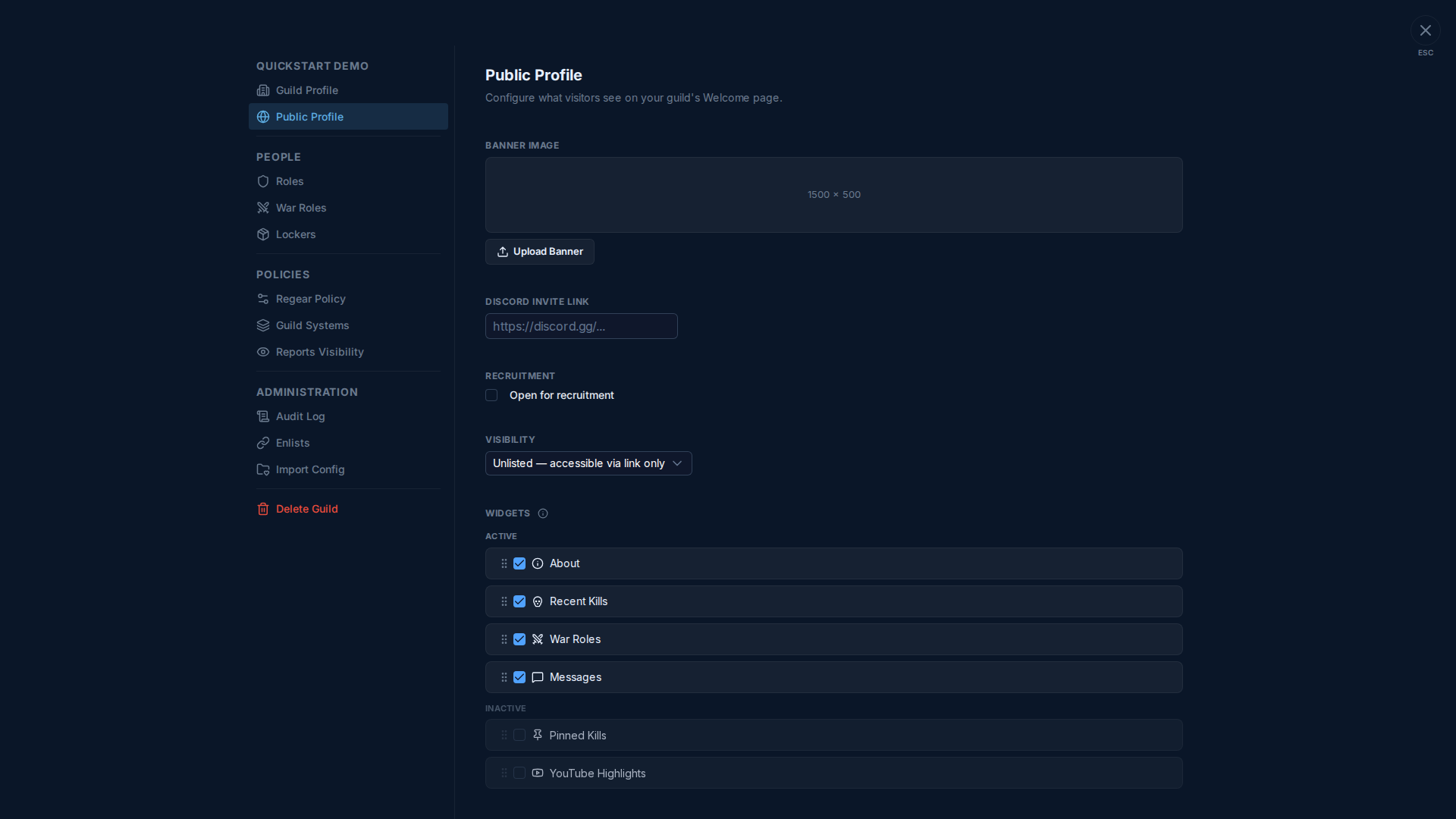
Banner image
1500 × 500-pixel image shown at the top of the public Welcome page. JPG / PNG / WEBP. Optional — without one, the page uses a default backdrop.
Discord invite link
Optional. If set, a Discord invite button on the public page sends visitors straight to your Discord server. Pasting any https://discord.gg/<code> URL works.
Recruitment
Single checkbox: Open for recruitment. When on:
- Your guild shows up on the Guild Discovery browse page.
- The Welcome page gets a prominent Apply to join button at the top.
When off:
- Guild Discovery hides you.
- Welcome page still works (for sharing the link to specific recruits) but with no join button.
Visibility
Dropdown with three options:
| Option | Effect |
|---|---|
| Public — listed on Guild Discovery | Anyone can find your guild via search / browse. Requires Recruitment also on. |
| Unlisted — accessible via link only | The Welcome page works for anyone with the URL, but nothing on the Discovery browse points to you. |
| Private — staff only | The Welcome page returns a "not found" for visitors. Members in the guild can still see all the internal channels. |
Widgets
The Welcome page is composed of stackable widgets (About, Recent Kills, War Roles, Messages, Pinned Kills, YouTube Highlights, …). Tick to add a widget to the ACTIVE list; drag to reorder. Unticking moves it back to INACTIVE without losing its config.
Widgets render top-to-bottom in the order shown here.
Cross-links
- Settings → Guild Profile — the icon + display name + description + Custom URL.
- Owners — Public profile + Custom URL — visitor-side walk-through of the Custom URL flow.
- Guild Discovery — the browse page that uses Visibility + Recruitment.
- #Welcome — what members see as the in-guild equivalent.