
#Treasury
The guild's subscription-tier console + member Gold contribution fund. Lives under GUILD → Treasury — sits at the bottom of the GUILD sidebar group, after #Members, #Allies (when present), and #CTA Timer.
Always visible to every member — Treasury is a public-to-guild surface so any member can see the current tier + chip in toward an upgrade.
Permissions
- Everyone can see the tier + comparison + deposit Gold.
- Manage Guild Billing permission is required to actually redeem the pooled Gold into a tier upgrade.
What's on the tab
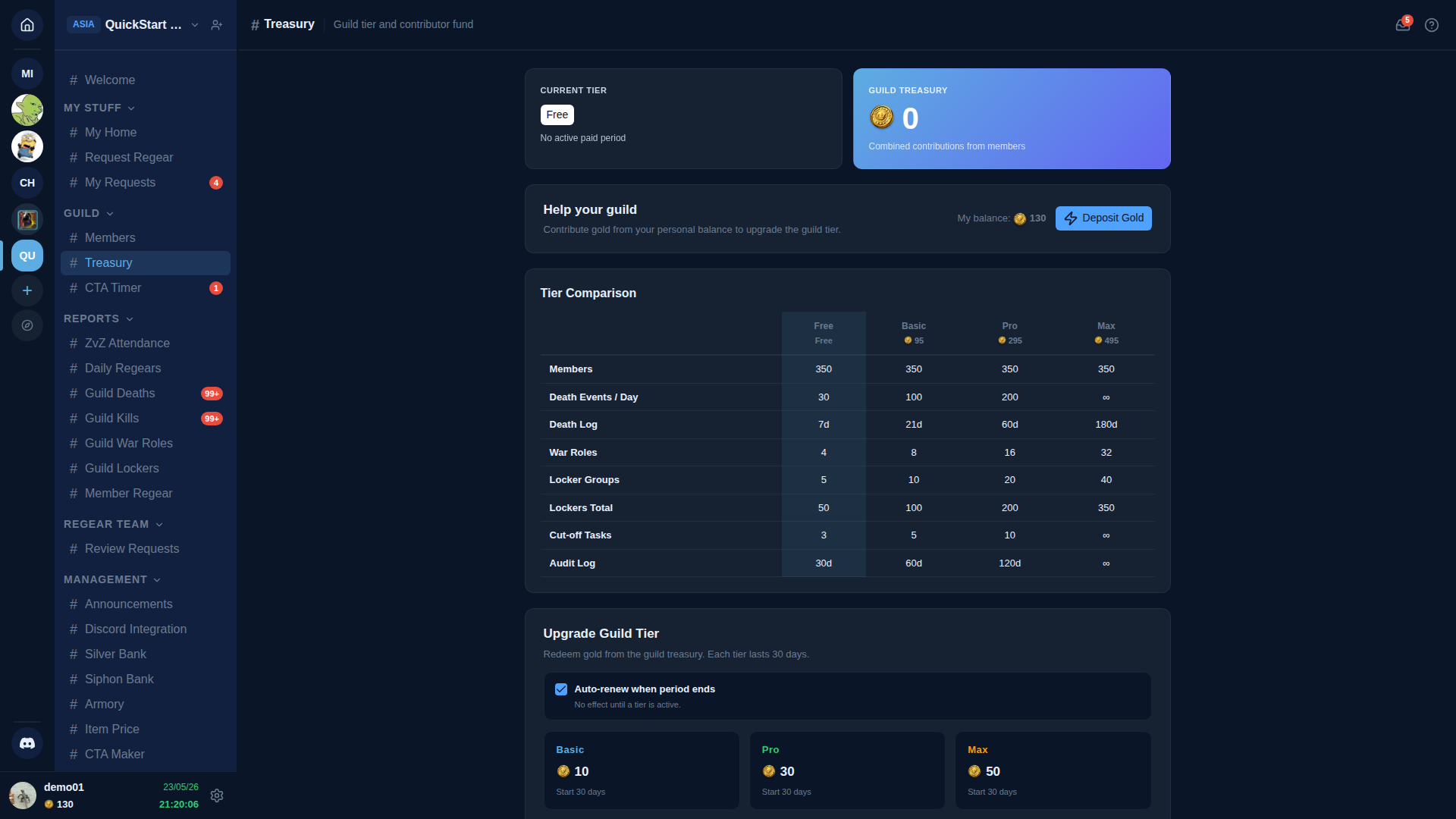
The page has four sections top-to-bottom:
Current Tier + Guild Treasury
Two side-by-side cards:
- Current Tier — the active subscription tier (Free / Basic / Pro / Max) + when the current paid period expires.
- Guild Treasury — the pooled Gold balance contributed by members.
Help your guild
A Deposit Gold button that moves Gold from the member's personal balance into the guild treasury. Members see their own current personal balance + the deposit form.
Tier Comparison
Side-by-side feature matrix across all four tiers — quotas for Members, Death Events / Day, Death Log retention, War Roles count, Locker Groups, Lockers Total, Cut-off Tasks, Audit Log retention, etc. The active tier is highlighted.
Upgrade Guild Tier
Pick a target tier + duration (each tier lasts 30 days). The Gold cost is shown on each tier card; clicking the card debits the treasury and starts the new tier period immediately. Auto-renew when period ends keeps the tier rolling without manual intervention.
Gold flow
Member personal Gold → Deposit → Guild Treasury → Upgrade → guild gets the higher tier.
For the personal-Gold side (how members get Gold in the first place), see #My Gold.
Cross-links
- Subscription tier + billing (owner side) — the personal Gold flow + how tiers gate features.
- Settings → Guild Systems — many systems are tier-gated.